If you’re looking for a good overview of AWS services, this AWS Whitepaper is a useful resource. It provides a high-level introduction to the various services available across the AWS platform.
Overview of Amazon Web Services
A blog documenting my journey through Software and DevOps engineering.

Programming
Networking
DevOps
Linux
Docker
CI/CD
Kubernetes
Career
Technology
Self-development
Check out the latest short form blog posts below!
A curated collection of insights, learnings, videos, resources, and short-form blog posts covering data, programming, technology, and DevOps engineering. It serves as a space for capturing knowledge in all its forms, from quick notes and code ideas to tools, concepts, and everything in between that I am currently exploring and learning.
If you’re looking for a good overview of AWS services, this AWS Whitepaper is a useful resource. It provides a high-level introduction to the various services available across the AWS platform.
Overview of Amazon Web Services
Share this post!
Found this helpful.
Share this post!
It’s interesting to get a better understanding of how real systems would be architected in AWS.
Share this post!
The Tutorial Dojo website has been a great resource for learning about AWS. It has lots of great information that has been summarised to help you learn about the cloud quickly and easily. I am using it as part of my preparation for the Certified Cloud Practitioner certification.
Share this post!
Once I can get my hands on an old laptop, I think Omarchy will be the first Linux distro that I try out.
Share this post!
Alongside preparation for the Network+ certification, I want to start deepening my understanding of AWS. I will be pushing to do the AWS Certified Cloud Practitioner certification, which is the most foundational way to understand AWS from a high-level.
I will be using this free video as a guide, and might purchase some practice exams on Udemy for extra practice. I am not in a rush to complete this, and so I will work through a few hours per week when I find some extra time.
Share this post!
Even though AWS learning is a fair distance away, I am gently starting to get a better understanding of its complexity, mostly out of interest. Once the time comes, then I can start my dedicated learning.
Share this post!
This weekend, to lay a good foundation for further studying, I will be watching this course video on networking. Going to watch it once through, with some extra research, and then fill in the gaps going forward.
Share this post!
Learning networking properly is one of the best foundations you can build for becoming good at DevOps because almost everything in modern infrastructure communicates over a network. When you understand how IP addresses, DNS, routing, ports, TCP/UDP, HTTP, firewalls, subnets, load balancers, and network security actually work, technologies like Docker, Kubernetes, AWS, CI/CD, and cloud infrastructure become much easier to understand.
Instead of simply memorising commands or copying configurations, you start to understand what is actually happening underneath the abstraction, where traffic is going, why a service can’t connect, why a container can’t reach another container, why DNS fails, or why a firewall is blocking something. Networking therefore gives you the mental model that connects Linux, containers, cloud platforms, security, and distributed systems together, making it a genuinely strong foundation for becoming a capable DevOps engineer.
Share this post!
The Linux distro ecosystem is really cool. Can’t wait to try and install more of these over time. Have a feeling I might switch fully to Linux in the future, but one step at a time.
Share this post!
If you were not yet aware of how substantially important Linux is to modern world infrastructure and systems, here is a summary of where Linux can be found.
Modern companies:
Google, Amazon / AWS, Microsoft / Azure, Meta, Netflix, Apple, IBM, Red Hat, NVIDIA, Cloudflare, Spotify, Uber, Airbnb, LinkedIn, GitHub, Samsung, Toyota, Mercedes-Benz and many more.
Real world systems:
Cloud servers, data centers, web servers, APIs, Kubernetes clusters, Docker containers, databases, networking equipment, routers, firewalls, Android phones, smart TVs, cars, banking systems, payment infrastructure, telecommunications, 4G/5G infrastructure, supercomputers, AI infrastructure, IoT devices, security cameras, industrial automation, satellites, scientific computing, gaming devices, NAS devices, home servers and many more.
If you are looking for a relevant and valuable skill to learn, Linux certainly is one of them.
Share this post!
I have decided that at the end of August, I will be officially starting my 3-4 month journey of acquiring the CompTIA Network+ certification.
At first glance, Network+ might seem unrelated to DevOps, but networking is underneath almost everything in modern infrastructure. Containers, Kubernetes, cloud platforms, CI/CD pipelines, DNS, routing, firewalls and load balancers all depend on networking fundamentals.
I’m studying Network+ because I want to develop a strong understanding of these fundamentals rather than treating networking as a black box.
My primary focus with certifications is not simply obtaining the certification. I see certifications as structured learning frameworks that give me a defined syllabus, clear objectives and a way to measure my progress. The knowledge is the real goal, with the certification acting as a useful milestone.
To prepare for this certification, I’ll be using the CompTIA Network+ Study Guide alongside Professor Messer’s Network+ resources on YouTube. I’ll also use Jason Dion’s practice exams on Udemy for additional exam preparation and knowledge testing. As mentioned above, I am pushing to prepare and complete the certification within 4 months.
Ultimately, I don’t want to become a network engineer. I want to become a master DevOps engineer who understands the networking foundations that the rest of the infrastructure depends on.
Mastering every level in this way, will make you an undeniable expert in your field.
I will write some blogs about my experience, preparation, tips, mistakes and anything I think will be valuable for anyone to know. I will keep you updated along the way.
Share this post!
Two books that have had a profound impact on my career are Deep Work and So Good They Can’t Ignore You by Cal Newport.
The ideas in these books continue to shape the way I approach learning, developing valuable skills, and building a meaningful career. They’ve changed how I think about focus, deliberate practice, and the importance of becoming exceptionally good at what you do.
If you’re looking to grow professionally, I can’t recommend them enough.
Share this post!
I’ve found that ambient music like this helps me enter a deep state of focus when I’m coding or learning something new. This channel has some of my favourites, but there are countless great options across YouTube. Creating an environment that supports deep, uninterrupted work can make a remarkable difference to both your learning and your productivity.
Protecting those moments of deep focus, over time, can help you become a top performer in your chosen field.
Don’t underestimate the power of deep concentration and how much it can change your life should you develop and use it.
Share this post!
Share this post!
If you are looking to get a much better idea of what Nginx is, why it is useful and how it can be used, here are 4 great Medium articles—
Article 1 — NGINX – Zero To Hero: Your Ultimate Guide from Beginner to Advanced Mastery
Article 2 — Practical Nginx: A Beginner’s Step-by-Step Project Guide
Article 3 — Mastering NGINX: A Beginner-Friendly Guide to Building a Fast, Secure, and Scalable Web Server
Article 4 — Nginx Explained: A Deep Dive into Its Architecture and Configuration
Article 5 — Inside NGINX: How We Designed for Performance & Scale
These provide a great starting point as well as more links to further articles, so you can really go down a rabbit hole!
Nginx is an essential tool to understand in the modern tech world. It’s the best of its kind.
Share this post!
The more I read about the world of DevOps and cloud, I keep coming across this term cloud-native. So I decided to actually research what it specifically means.
Cloud native isn’t simply about running applications in the cloud. It’s about designing and building software specifically to take advantage of everything cloud platforms have to offer. Rather than moving a traditional application onto a cloud server, cloud-native applications are built from the ground up to be scalable, resilient, and easy to update.
A cloud-native application is typically built using technologies such as Docker, Kubernetes, microservices, APIs, Infrastructure as Code, CI/CD pipelines, and modern monitoring tools. These technologies allow different parts of an application to be deployed, updated, and scaled independently, making software faster to develop and more reliable to operate.
One of the biggest advantages of cloud-native architecture is resilience. If one service fails, it can often be restarted automatically without affecting the rest of the application. As demand grows, individual services can scale independently instead of requiring an entire system upgrade. This flexibility allows companies to release new features more frequently while maintaining high availability.
For DevOps, cloud native has become the standard way of building and operating modern applications. It brings together skills in Linux, Docker, Kubernetes, Terraform, cloud platforms like AWS or Azure, CI/CD, monitoring, and automation to create systems that are efficient, reliable, and ready to grow with business needs.
In short, cloud native is about building software that is designed for the cloud from day one, rather than simply running traditional software on cloud infrastructure.
Share this post!
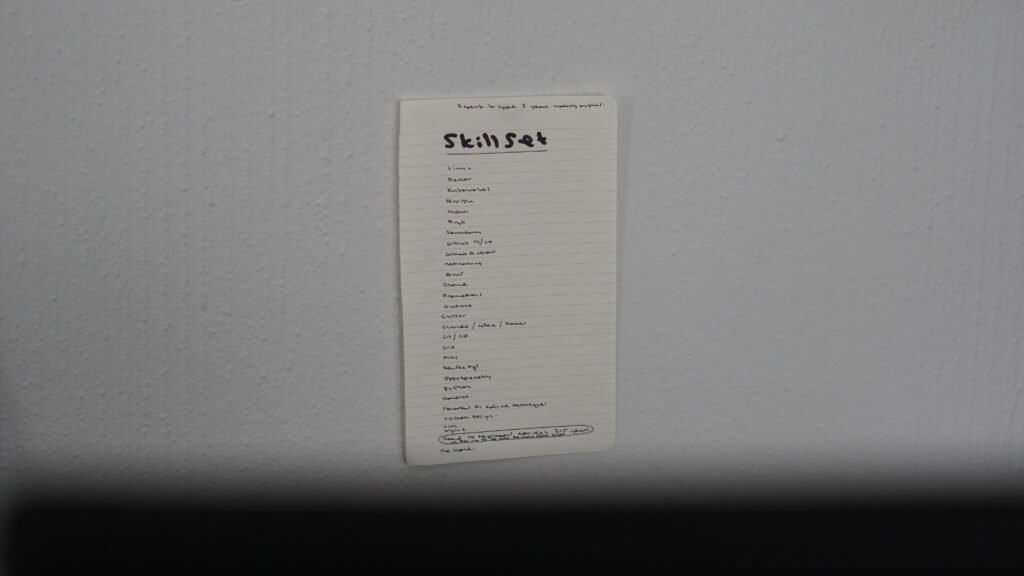
I stuck this skill list behind my laptop on the wall. It captures as many of the skills I’ll need as possible, including both brand-new skills and existing ones I plan to improve.
Looking forward to developing deep expertise across all of these skills and many more.
These skills define the next 5 years of deep focus.
Share this post!

Share this post!
A few months into the DevOps path and this is my current focus—
One step at a time. It’s going to be a long journey!
Share this post!
I woke up today ready to learn something along the massive DevOps path that lies ahead.
Within 30 minutes, though, I found myself feeling overwhelmed. I started thinking about everything I still need to learn and the tremendous amount of tools that I need to understand, and the journey suddenly felt impossibly long. My mind began telling me that today’s study session wasn’t even going to make a difference in the grand scheme of things.
Right as I was about to procrastinate, I reminded myself of a rule I’ve always held onto whenever I take on a long path: Every step counts. Just keep putting beans in the jar and you will get there.
You can’t reach the end without taking every single step along the way. Even a cathedral is built one brick at a time. Each brick seems small and insignificant on its own, but without every single one of them, there would be no cathedral.
So I reminded myself that all I need to do is decide what I’m going to learn today, understand where it fits into the bigger picture and why it’s worth spending time on, and then give that one small piece my full attention. I don’t need to master DevOps today. I just need to make today’s progress.
Every command I learn, every concept I understand, every lab I complete, and every problem I solve is another brick in the cathedral I’m building.
It never feels like much in the moment, but enough small steps, taken consistently, eventually become something extraordinary.
It’s always better to learn one meaningful thing today than to become so overwhelmed by the size of the journey that I end up learning nothing at all.
Share this post!
Came across this video today. Interesting to get insight into the history and politics of the tools we use.
Share this post!
Share this post!
A nice summary video of the current Claude ecosystem. Once you know the domain, you can pick and choose what will work best for you.
Share this post!
I am 28. Turning 29 in two months.
8 months ago I left my job to try pursue some business interests.
Moved back in with my parents.
Didn’t make the progress I had hoped to make.
Burned through all my savings in the process.
Burned out my nervous system.
Had to terminate my medical aid.
Returned back to the working world.
Rejected at most places I am applying to. Over 50 and counting.
Life could not have come to more of a standstill than this.
Looking at the above situation, integrating all the deep mistakes and lessons, I have never been more proud of myself for caring so much about my vision that I was willing to risk it all to bring it to life.
I have now faced some of my deepest challenges and inner fears.
I have never been more resilient.
I have never been more deeply hungry to build my vision.
I have since healed my nervous system.
I have built a sleep routine.
I no longer rely on caffeine for cheap energy.
I have cut out processed food.
I am back in a training routine.
I am stretching and meditating every single day.
My mind is calm and focused.
My work ethic is energised.
I have never been more determined to be undeniable.
Never again will I be average amongst the crowd. I aim to build myself to be of immense value. The type of value that has me be the one rejecting companies, not the other way around.
Life really is about how you respond to your decisions and the consequences that come with them.
Every day I remain grateful for the deep wisdom and maturity that comes from engaging with life, living at your edge and making mistakes in the process.
I look forward to the day I look back on this post from a much different place.
Share this post!
As AI becomes a core part of every engineer’s toolbox, the ability to design systems will only become more valuable. AI is becoming exceptionally good at building individual components quickly, but deciding how those components interact, communicate, and fit together into a reliable, scalable, and maintainable system remains a fundamentally human engineering challenge. The engineers who can think at the system level, not just the component level, will be the ones who create the most value.
This is one skill I will be investing heavily into over the next few years.
ByteByteGo has a great playlist on YouTube for system design fundamentals which gives a great summary on important concepts. It is a great place to start.
Here are some other cool videos which might help get you going—
Share this post!
Share this post!
I definitely need to get one of these. They seem insane! What a great way to get hands on experience with all the tools and practices that a DevOps engineer needs to know, right from your own home.
Just need to get a job again, so I can actually afford to set one up.
Share this post!
One of the most useful tools I’ve come across is Raycast.
At first, it just replaced the default Mac spotlight for me, but over time, it has become a powerful way to control my system, interact with apps, and connect directly into tools I already use.
What really makes Raycast stand out is the Raycast Store, which is packed with extensions for a huge range of apps and services. It turns your launcher into a central hub for productivity. Definitely check out their store! It has over 300 pages of interesting apps and utilities to connect to and use. Some of these include GitHub, Spotify, Slack, Notion, ChatGPT, Google Calendar, Linear, Google Drive, Google Search, Zoom, Cursor, Apple Music, Arc, Google Chrome, Safari, Figma and even system utilities like window management, process management, clipboard history, code snippets, pomodoro timer, running shell commands, color picker, manage bluetooth connections, locking keyboard to clean, image compression, quick calculations and everything else you can think of!
Raycast also has their own YouTube channel where they regularly explain new features and showcase interesting ways to use the tool.
Personally, I have found the free version to be more than capable for my needs so far, but I may explore the Pro version at some later point. If you do decide to upgrade to Raycast Pro, it includes some powerful extras such as Raycast AI (with support for providers including OpenAI, Anthropic, Perplexity, Mistral, Google, xAI, Baseten), cloud sync to keep your snippets, notes, and chats synced across your Macs and iOS devices, a built-in translator, unlimited Raycast notes, unlimited clipboard history, custom window management, and custom themes.
For anyone who spends a lot of time on their computer and wants to move faster with fewer clicks, Raycast is absolutely worth trying. Available on MacOS and Windows.
Here are some great starting videos for you to watch—
Share this post!
I was recently writing Linux flashcards by hand when I had a simple thought: why not build my own flashcard learning application?
It felt like the perfect project. I get to build something I will genuinely use while creating a full-stack application for my portfolio.
The idea is simple. I can add any skill I want to learn, create as many flashcards as I need, and even generate new ones on demand using an LLM. I’d also like to link each card to relevant articles or videos, making every flashcard a gateway to deeper learning.
Will I gamify it with streaks, accuracy tracking, and other features? Quite possibly. I’ll let the project evolve naturally as I use it.
Another goal is to use this project to learn more about deploying and running production applications from start to finish. This includes getting to know the principles of CI/CD better, as well as getting more involved with Github Actions.
Full project updates coming soon.
Share this post!
This is the level that I wish to understand the major tools that I use and will use.
Share this post!
I’ve self-taught myself every skill in my career and plan to teach myself expert level skills in software and DevOps engineering. Not because I’m a genius, but because we live in an era where that is actually possible.
We are living through a shift that is easy to underestimate. Knowledge is no longer locked behind universities, expensive courses, or gatekeepers. With Google (and now especially large language models like ChatGPT and Claude) information has become effectively infinite and instantly accessible.
Anything you want to learn is available at your fingertips. Entire books, lectures, tutorials, documentation, and structured learning paths can be accessed for free or at very low cost. Platforms like YouTube and sites like freeCodeCamp alone are enough to take someone from zero experience to job-ready in many software fields.
That means the barriers between where you are now and where you want to be are dramatically lower than ever before. They virtually don’t exist.
At some point, it is worth spending a full day simply contemplating the power of having Google as a tool. Really sit with it. Reflect on how profound it is that you can summon almost any piece of human knowledge instantly. If you truly understand that, it becomes difficult to stay the same.
Realizing what it means to have Google and what it provides will change the trajectory of your entire life and career.
Because the only real thing standing between you and transformation is no longer access. It is focus, hard work, and the patience needed to move through the process.
In theory, you could go from working at Starbucks to becoming a senior cloud engineer at Amazon if you used Google to its full capability. It is an infinite genie of pure potential.
How you choose to use it is completely up to you.
Share this post!
The longer I work with Linux, the more I see the fact that one of the most important commands is the ls command. It displays the files and directories in the current working directory or a specified location, making it easy to navigate and inspect the Linux file system.
I can see that to be as good as you can be with the command line, getting good at this command is absolutely foundational.
Here are 10 really common ways to use ls command:
List all visible files and directories in the current directory—
lsDisplay a detailed (long) listing, including permissions, owner, size, and modification date—
ls -lShow all files, including hidden files (those beginning with a .)—
ls -aCombine long listing format with hidden files—
ls -laDisplay file sizes in a human-readable format (KB, MB, GB)—
ls -lhSort files by modification time, with the newest first—
ls -ltSort by modification time, with the oldest files first—
ls -ltrRecursively list all files and subdirectories—
ls -RList the contents of a specific directory without navigating to it—
ls /path/to/directory List only files matching a pattern (e.g., all .txt files)—
ls *.txtList only the directories in the current location—
ls -d */Sort files by size (largest first)—
ls -SSort files by extension—
ls -XAs always, if you get stuck using this command and wish to learn more, use the man pages—
man lsThere are many, many options that come with the ls command that you may find useful for different situations! This command is fundamental, so get familiar with it.
Share this post!
If you want a super short introduction to Linux, here it is. These videos from the Fireship YouTube channel are great for the absolute beginner.
Share this post!
If you are like me, then your laptop’s downloads folder gets overwhelmingly busy in a short period of time. Every month of every year.
This morning, I decided that since I’ve been learning Linux and the command line, I should try applying my skills creatively to solve a small problem.
This is a small Bash script I built to automatically keep my Downloads folder organised. It runs through all files, sorts them by type, and separates out older files for later cleanup.
First, I created a file called downloads-organiser.sh which contains the following code:
#!/usr/bin/env bash
set -euo pipefail
DOWNLOADS="$HOME/Downloads"
CLEARANCE_DIR="$DOWNLOADS/check-for-clearance"
mkdir -p "$CLEARANCE_DIR"
find "$DOWNLOADS" -type f | while IFS= read -r file; do
    [[ "$file" == "$CLEARANCE_DIR/"* ]] && continue
    filename=$(basename "$file")
    if find "$file" -mtime +60 | grep -q .; then
        if [[ -e "$CLEARANCE_DIR/$filename" ]]; then
            mv "$file" "$CLEARANCE_DIR/${filename%.*}_$(date +%s).${filename##*.}"
        else
            mv "$file" "$CLEARANCE_DIR/"
        fi
        continue
    fi
    if [[ "$filename" == *.* ]]; then
        extension="${filename##*.}"
        extension=$(echo "$extension" | tr '[:upper:]' '[:lower:]')
    else
        extension="no_extension"
    fi
    destination="$DOWNLOADS/$extension"
    mkdir -p "$destination"
    if [[ "$(dirname "$file")" == "$destination" ]]; then
        continue
    fi
    if [[ -e "$destination/$filename" ]]; then
        mv "$file" "$destination/${filename%.*}_$(date +%s).${filename##*.}"
    else
        mv "$file" "$destination/"
    fi
done
find "$DOWNLOADS" -mindepth 1 -type d ! -path "$CLEARANCE_DIR" -empty -delete
This is what the script does:
~/Downloads for all filescheck-for-clearancecheck-for-clearanceno_extension)Once I had the script setup, the next thing to complete was setting up the cron job so that it could run on its own every Monday morning:
Make the file executable for the cron job—
chmod +x ~/bin/downloads-organiser.shOpen my crontab editor—
crontab -eAdd the weekly job for every Monday at 9am—
0 9 * * 1 /Users/stephenkettley/Documents/Scripts/downloads-organiser.shVerify that the cron job was saved—
crontab -lOverall, I am super chuffed that my Downloads folder is going to stay relatively clean going forward. I love code!
Share this post!
This is a very good video for getting a general introduction to important networking concepts such as how devices connect using Ethernet, Wi-Fi, MAC addresses and switches, how IP addressing, DHCP, subnets, and routing help devices communicate across networks, how routing protocols like OSPF and BGP power the internet, and how TCP vs UDP, ports, firewalls, TLS encryption, and VPNs all work together to secure and manage data transmission.
Share this post!
I found this video very informative as an entry point for beginning to understand the most popular network protocols. The more I research, the more I am seeing how fundamental it is to have a good grasp of networking as a foundation to becoming a powerful DevOps engineer.
Share this post!
I recently heard about an interesting challenge that someone’s mentor gave them while they were learning Linux.
Whenever they got stuck, they were only allowed to use the man pages to figure it out.
He said that his mentor told him that if there was any advice that would make him a hardcore Linux user, it was this.
At first, it sounds restrictive, but the more I thought about it, the more I realized how powerful the exercise is. It forces you to become comfortable navigating documentation, understanding command syntax, and finding answers independently instead of immediately reaching for Google or ChatGPT. It trains resourcefulness at a whole new level.
There is also a practical benefit. One day, you may find yourself logged into a production server with no internet access, needing to solve a problem under pressure. In that situation, the man pages are not just documentation. They are one of the most valuable tools you have.
For those who don’t yet know, man pages (short for manual pages) are built-in Linux documentation that explain how commands, programs, and system functions work. They include details like usage syntax, options, and examples, and can be accessed directly from the terminal using the man command, such as: man ls
Example of the man pages for the command traceroute—
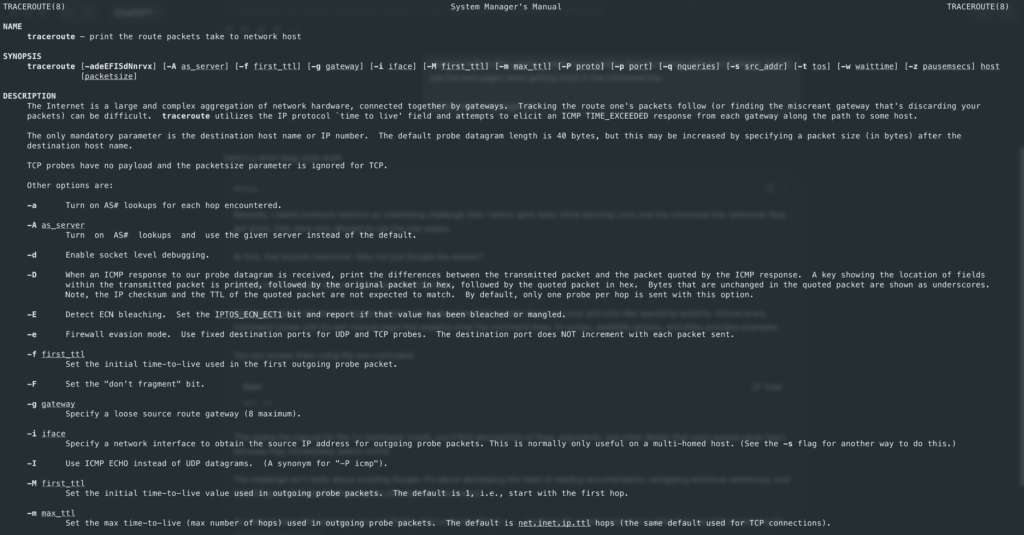
As I dive deeper and deeper into all the domains of Linux, I want to challenge myself to use only the man pages as much as possible, only reaching for Google or an LLM when absolutely necessary.
Share this post!
My learning often shifts between two modes: going deep into individual tools, and then zooming out to see how they fit into the bigger system. That back-and-forth is where things start to make sense. I am trying to teach myself to see DevOps less as individual technologies and more as a continuous lifecycle where each tool has a specific role in moving software from idea to production.
These types of videos help with deepening my understanding of the high-level system. This video was really well done.
Share this post!
After doing my research, I’ve put together a map of potential certifications that I might work through over the next 5 years as I continue building my path into DevOps.
This list is not fixed, and it’s not a strict roadmap. Certifications are useful, but they are not the ultimate goal or the determining factor of becoming a good engineer.
These are simply ideas and options that could be in the pipeline depending on what direction I take and what I need at the time. I definitely won’t end up doing all of them (knowing me I might), but they represent the areas I may explore as I develop my skills and move further into the DevOps and cloud space.
The certifications I’m currently looking at include:
Should I choose to do any of these, I will definitely share my preparation, resources I used, details about the certification and my overall experience. I will definitely help you get prepared for them, in the same way I was able to.
This list represents the different areas I may explore as I build deeper skills in infrastructure, cloud, automation, and DevOps engineering. It’s less about collecting certifications, and more about using them as structured learning paths where needed, depending on the problems I want to solve and the roles I move into.
Share this post!
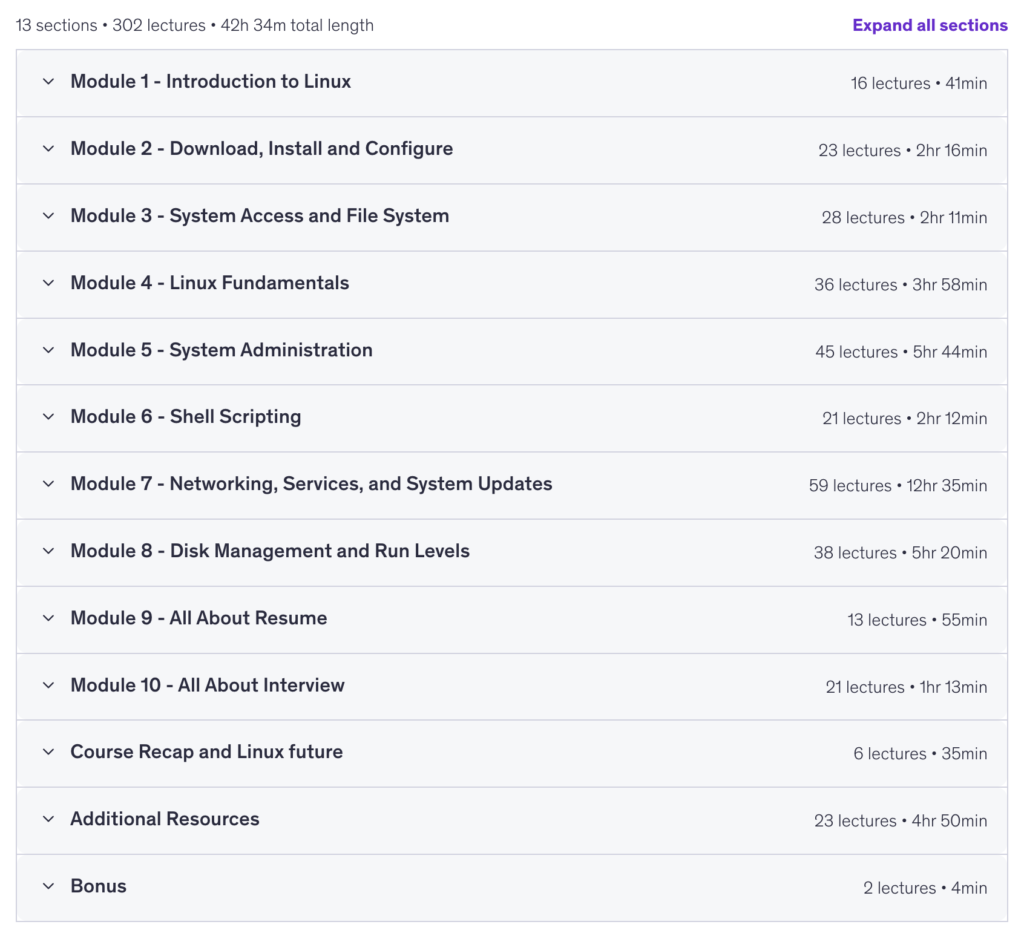
To build a solid foundation in Linux, I decided to follow a structured learning approach by purchasing a course to help me get familiar with the core concepts. I’m currently on Module 7.
So far, the course has been extremely helpful as an introduction to many important topics. It exposes me to key Linux concepts in a structured way, which I then reinforce by experimenting hands-on and doing further research using ChatGPT and YouTube tutorials.
This combination of structured learning and self-driven exploration has been very effective in helping me deepen my understanding.
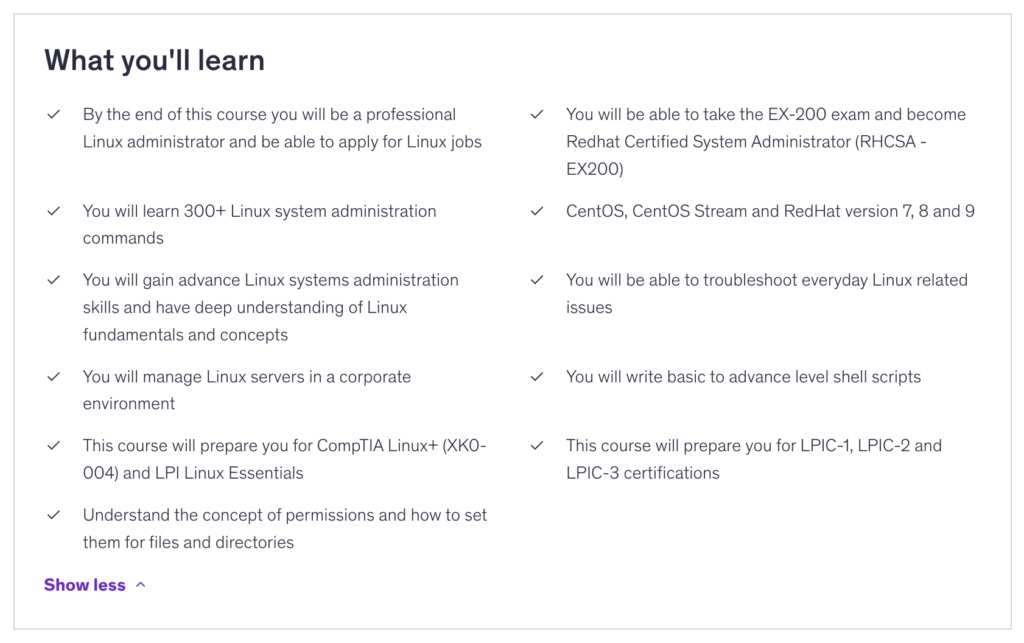
Udemy Course: Complete Linux Training Course to Get Your Dream IT Job 2026
Click here to view the course.
Below I have shown some of the major learnings and objectives of the course.
Share this post!
As I dive deeper into Linux, I’m shifting away from simply learning commands to complete tasks and instead focusing on understanding the full underlying process, connecting the different components to see how everything works together under the hood.
It may not always be necessary, but I’m genuinely finding it fascinating. I will share as much of what I learn as possible. My goal is to get as deep an understanding of each tool and skill I need to learn across the entirety of DevOps.
Here’s an example of something I was exploring today as I work toward building a more holistic understanding of Linux.
Share this post!
I plan to self-teach the entire DevOps and DevSecOps field.
How do I plan to do that?
I will be using a mix of structured learning, practical exploration, and continuous research. One of the major purposes of my entire blog will document the journey as I build both knowledge and hands-on skill.
My approach includes Udemy courses for structured foundations, YouTube courses and standalone videos for practical understanding, and popular LLMs to help refine and clarify complex concepts. I will also rely on standard Google research for real-world context and troubleshooting perspectives.
Official documentation will remain a core reference point throughout, as I want to build the habit of learning tools from the source.
However, the most important part of my learning will be building projects (everybody knows the trap of tutorial hell). At every stage of progression, I will focus on finding or creating projects that force me to apply what I’ve learned. This includes both guided projects and self-designed ideas that grow in complexity as my skills improve. These will all be documented in my blog.
In addition, I aim to eventually connect with one or two experienced engineers in the field for mentorship and guidance.
If any potential mentors happen to come across this, feel free to reach out!
This will most definitely not be a linear path, but a continuous process of learning, building, and refining. I can only expect many mistakes to be made along the way!
Share this post!
As I embarked on my journey toward DevOps mastery, I spent time exploring the landscape of the field and identifying the technologies and concepts that form the foundation of modern infrastructure and platform engineering. The following are the skills I have chosen to focus on and the reasons I am learning them.
Linux → To build a strong foundation in operating systems, system administration, and server management.
Docker → To package applications consistently and run them reliably across different environments.
Ansible → To automate configuration management and reduce manual infrastructure work.
Kubernetes → To orchestrate, scale, and manage containerized applications in production environments. I am most excited about Kubernetes!
Helm → To simplify Kubernetes deployments through reusable and version-controlled application templates.
Argo CD → To implement GitOps practices and automate Kubernetes application delivery.
Terraform → To provision and manage infrastructure as code across cloud platforms.
GitLab CI / GitHub Actions → To automate testing, building, and deployment workflows.
CI/CD → To deliver software faster, more reliably, and with fewer manual steps.
Networking → To understand how systems communicate and how modern infrastructure is connected.
AWS & Cloud → To gain hands-on experience with the cloud services that power modern applications.
Observability → To understand system behavior, troubleshoot issues, and improve reliability.
Prometheus → To collect and store metrics for monitoring applications and infrastructure.
Grafana → To visualize metrics and build dashboards that provide operational insights.
System Design → To understand how to design scalable, reliable, and efficient systems, and to connect individual tools into complete end-to-end architectures.
Nginx → To handle incoming web traffic, act as a reverse proxy, load balancer, and secure entry point for applications and APIs in production environments.
DevSecOps → To integrate security into every stage of the DevOps lifecycle, ensuring systems are built and deployed with security as a core principle rather than an afterthought. This will come once I am better at the core DevOps skillset.
My goal is not only to learn individual tools but to understand how they work together to build, deploy, monitor, and operate modern software systems at scale. This list is not extensive, and I know there are other tools that I will likely pick up along the way. As I discover better tools to use and when to use them, this list will dynamically shift and change. Either way, I am excited for the road ahead,
It’s going to be a tough one, but a fun one.
Share this post!
In October 2025, I left my software engineering job to pursue some business interests that I had become increasingly passionate about. Purpose, passion, personal growth, and building something meaningful have always been values that sit very high on my list, and at the time I felt strongly that the next step in my life was to try and turn some of those ideas into reality. Looking back, I can see that while the passion was real, the decision itself was somewhat rushed. I had enthusiasm and ambition, but not nearly enough planning, experience, or understanding of what it would take to successfully build a business from the ground up.
Although the venture did not unfold the way I had imagined, I do not view that period as a failure. In many ways, it became one of the most important learning experiences of my life. Over that time, I learned a tremendous amount about myself, my health, my values, what motivates me, what drains me, what I want from life, and perhaps most importantly, what I do not want. I most certainly also learned about the stress of financial insecurity. I gained clarity on the type of future I want to build and the kind of person I hope to become. I also learned that some ambitions are not necessarily wrong, they are simply early. What I had chosen to pursue was not something I needed to abandon, but rather something I needed to approach with greater patience, maturity, and preparation.
As I reflected on where I wanted to go next, I found myself becoming increasingly interested in DevOps engineering. What began as curiosity quickly grew into a genuine fascination with the systems, infrastructure, automation, networking, cloud platforms, and operational challenges that sit behind modern software. I don’t remember the first moment I found it, but I do remember it arrived almost serendipitously in my life.
At the same time, I started thinking differently about careers. Prior to leaving my job, I think I took certain aspects of my career for granted. After stepping away from it, I developed a much deeper appreciation for the value of building strong foundations, developing highly valuable skills, and investing in a long-term professional journey. Rather than seeing a career as something separate from purpose, I began to see it as one of the most powerful vehicles through which purpose can be expressed.
This blog exists to document that journey. While backend engineering will continue to be a major part of my work and identity, much of the content here will focus on DevOps engineering, the path toward mastering it, and everything I learn along the way. I intend to share projects of all sizes, from small experiments and proof-of-concepts to larger systems and portfolio pieces. I’ll be documenting insights, mistakes, lessons learned, technical deep dives, useful resources, tutorials, books, videos, articles, and any other material that contributes to my growth as an engineer. If something helps me better understand technology or become more effective in my career, there is a good chance it will find its way onto this site.
My hope is that this blog becomes more than just a personal notebook. While it will initially consist of short-form posts, project updates, technical notes, and longer articles covering specific topics, I would love for it to evolve into a valuable learning resource for others who are interested in software engineering and DevOps. One of my goals is to document the journey thoroughly enough that someone coming behind me could use parts of it to accelerate their own learning, avoid common mistakes, and gain a clearer understanding of what it takes to build a strong career in technology.
Beyond technical content, I also plan to occasionally write about topics related to career development, learning, discipline, purpose, and personal growth. My attempt at building a self-development and life coaching business taught me that technical skills alone are rarely enough. Building a meaningful career requires clarity, consistency, curiosity, and a willingness to continuously develop yourself both professionally and personally. Those lessons have become increasingly important to me, and I expect they will naturally find their way into many of the things I write about.
As for the self-development brand that originally inspired me to leave my job, I have not given up on it. If anything, I believe in it more than ever. The difference is that I now see it as something that should be built gradually and patiently alongside a strong career rather than in place of one. For now, my focus is on becoming an exceptional engineer, deepening my understanding of backend and DevOps engineering, and creating a foundation that will support larger ambitions in the future.
I believe the greatest value I can provide comes from the intersection of my passions for programming, technology, personal growth, and purposeful career development.
I am incredibly excited about where this journey may lead. This blog will continue to evolve over time, and I hope to keep expanding it with new projects, resources, ideas, and features as I learn more and gain new experiences. Whether you are an experienced engineer, someone just beginning your career, or simply a curious learner who enjoys technology, I hope you find something useful here.
Thank you for following along, and welcome to the journey.
Share this post!
View My Resume
Current Skill Focus — Linux
Next Certification— CompTIA Network+
Long blogs coming soon.
Projects coming soon.

My name is Stephen Kettley, and I am a Backend Software Engineer with a background in Data Analysis and Data Science, holding a Mathematics degree from the University of the Witwatersrand.This blog documents my journey as I continue developing into a stronger software engineer and DevOps engineer.
My goal is to deepen my understanding of how modern systems are designed, built, deployed, and operated by exploring cloud infrastructure, automation, Linux, Docker, Kubernetes, Terraform, observability, CI/CD, networking, and much more.Along the way, I share practical learnings, technical insights, experiments, useful resources, and lessons from real-world projects and challenges as I work toward becoming a more well-rounded engineer.
My vision is to consistently document and share my journey, knowledge, and resources, with the hope that one day I can inspire and teach others how to build a powerful and successful tech career, potentially expanding this into structured learning and courses in the future.

This blog is only available on desktop devices.